
EnterpriseOne Event Rules Debugger Broker Error
Share
Read Time:0 Sec
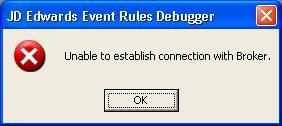
The other day I was notified by a developer that he was receiving the errors pictured to the left when opening the d
Average Rating
5 Star
0%
4 Star
0%
3 Star
0%
2 Star
0%
1 Star
0%
One thought on “EnterpriseOne Event Rules Debugger Broker Error”
Leave a Reply Cancel reply
This site uses Akismet to reduce spam. Learn how your comment data is processed.
More Stories
Windows God Mode… What!?!
Windows God Mode is a hidden feature in the Windows operating system that allows users to access all of the system’s control panel options and settings in a single place.
How To Test A SQL Server Connection
There is an easy way to test your SQL Server connection when running Windows without any special software. I found...
4 Lines To Export Outlook Rules To Excel/CSV Using PowerShell
I used to use a ton of Outlook Rules to organize the thousands of emails that I receive each day....
Get The Size & Record Count Of All Tables In A SQL Server Database
Use the SQL query below to display the size and record count of all tables in an SQL Server database....
How To Get AS400/iSeries Job Queue Information Using SQL
I received a request the other day about the JD Edwards EnterpriseOne job queues and what the maximum number of...
The EnterpriseOne CNC Job Description
The JD Edwards ERP Specialist is responsible for maintaining the JD Edwards EnterpriseOne platform and auxiliary systems from a development, CNC, system administration, and functional consultant perspective to create and maintain business solutions.
oh yes it helps !! many thanks